Network crash book(1)
This summary is based on Hoony’s Easily Written Cisco Networking (3rd Edition) by Kang Hoon Jin (ISBN: 978-89-315-5116-7), often referred to as the “Network Bible” in Korea. I have condensed the content to highlight essential facts while eliminating unnecessary detail. 나만 알아보면 충분하므로 중요내용은 한국어로 적어질 수 있습니다.
PART 1: Introduction to Network
| Feature | Internet | Extranet | Intranet |
|---|---|---|---|
| Access | Public (Anyone) | Authorized (Internal + Partners) | Private (Internal only) |
| User Group | Everyone globally | Employees and Trusted partners | Employees/Members only |
| Primary Purpose | Information sharing | Business-to-business (B2B) | Internal operations |
| Security | Low | Medium to High | High |
| Protocols | TCP/IP | ? | TCP/IP |
프로토콜 부분은 책에서 인터넷, 인트라넷만 밝혔으므로(적어도 현재 장에서는) 엑스트라넷은 물음표 처리 했다. 반면, 제미나이는 셋 다 TCP/IP를 지원한다고 주장한다.
PART 2: Network, cables and its friends
What is LAN?
LAN: A Local Area Network is a private network that connects devices within a limited geographical area, such as a home, office, or school building.
WAN: A Wide Area Network is a large-scale network that connects multiple LANs across vast distances, such as cities, countries, or the entire globe.
What is Ethernet?
Ethernet: It is a networking method representing over 90% of the market in Korea that relies on the CSMA/CD protocol for communication.
CSMA/CD: It is a protocol where devices sense the network for an idle state before sending data and wait for a random duration to retry if a collision is detected.
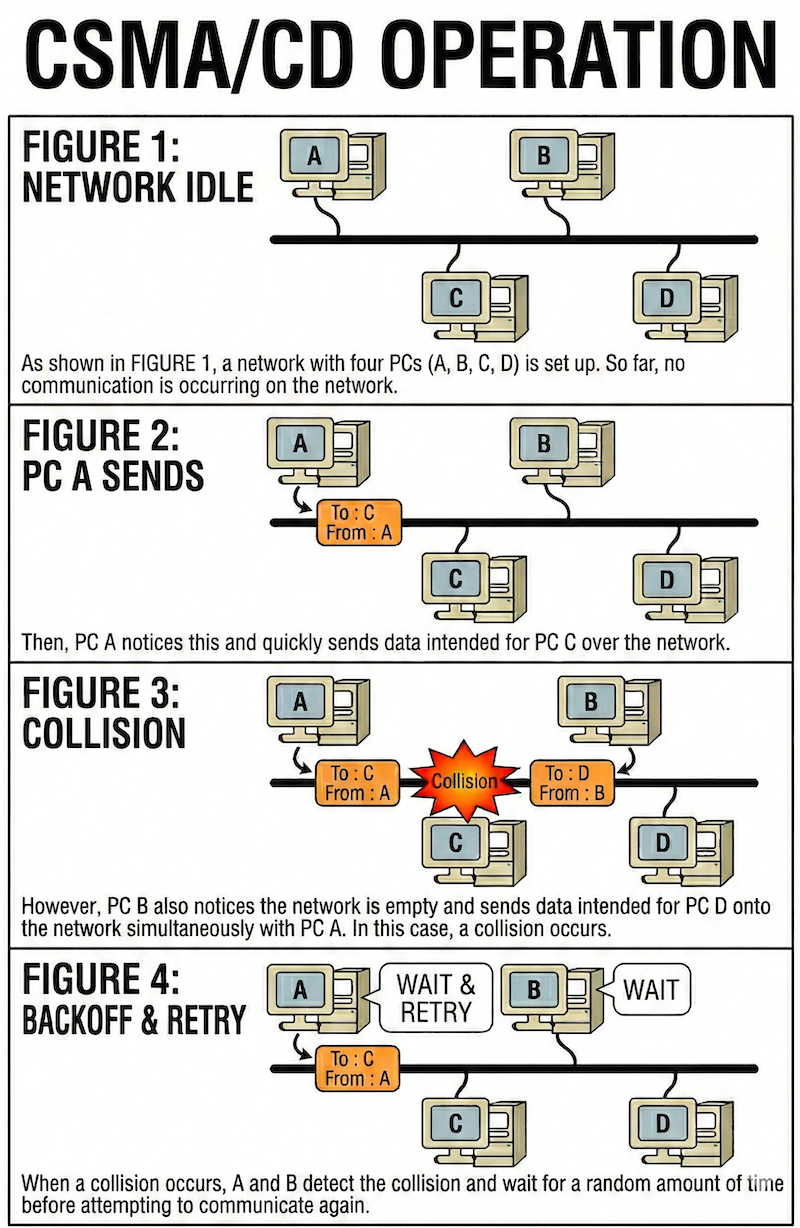
책에 있는 삽화가 직관적이지 않아서 AI한테 타이핑으로 묘사한 후 그려 낸 가이드.
What is TokenRing?
Token Ring is a collision-free network protocol where only the PC holding a “token” can transmit data, but it eventually became obsolete due to Ethernet’s superior speed and efficiency. Token Ring supported speeds of 4 Mbps or 16 Mbps. It was eventually superseded by Ethernet, which scaled rapidly to 100/1000 Mbps
Cables
1. Cable Types and Structure
- TP (Twisted Pair): Copper wires twisted in pairs to reduce interference.
- UTP: Unshielded. The most common and cost-effective type.
- STP: Shielded. Uses insulation to block EMI (Electromagnetic Interference).
- Fiber Optic: Uses light signals. Requires at least 2 cores (one for Tx, one for Rx).
- Legacy: Coaxial (Thin/Thick), BNC, and AUI connectors.
2. UTP Categories
- Cat 3: Supports 10 Mbps (10 Base T).
- Cat 4: Supports 16 Mbps (Token Ring).
- Cat 5: Supports 100 Mbps. Can handle Gigabit speeds if all 8 wires are utilized.
3. Naming Conventions (e.g., 10 Base T)
- Leading Number: Transmission speed (10 = 10 Mbps, 1000 = 1 Gbps).
- Base: Baseband (Digital signaling).
- Suffix: Indicates cable type or maximum distance.
- T: Twisted Pair (UTP).
- FL/SX/FX: Fiber optic.
- 2/5: Max distance (2 = ~200m, 5 = 500m).
4. Key Communication Standards
- 10 Base T: 10 Mbps, UTP, 100m limit, RJ45 connector.
- 100 Base TX: 100 Mbps, Cat 5 UTP, 100m limit.
- 1000 Base T: 1000 Mbps, Cat 5 UTP, requires all 8 wires.
- 1000 Base SX/LX: Gigabit standards for fiber optic cabling.
5. UTP Wiring and Connection
- Pinout: Of the 8 wires, pins 1, 2, 3, and 6 are the primary paths for data.
- Straight:through: Same pin order on both ends. Connects different devices (e.g., PC to Switch).
- Crossover: Swaps pins 1, 2 with 3, 6. Connects similar devices (e.g., PC to PC, Hub to Hub).
6. Leased Line Speed Standards
- T1: 1.544 Mbps (North American standard).
- T3: 45 Mbps (North American standard).
- E1: 2.048 Mbps (European standard).
- Note: Actual throughput is roughly 60% of theoretical speed due to network overhead.
(케이블 파트는 다 옮겨 적기엔 스압이 심하다. 필요하면 책으로 돌아가 읽기를 권장.)
MAC address
1. Definition
The Media Access Control (MAC) address is a unique physical identifier assigned to network hardware such as LAN cards, routers, and switches.
2. Address Resolution Protocol (ARP)
Since IP addresses alone are insufficient for local communication, ARP is used to discover the physical MAC address associated with a known IP address. (IP를 MAC address로 변환하는 과정임 걍)
3. Structure
A MAC address consists of 48 bits, usually represented as 12 hexadecimal digits. OUI (Organizationally Unique Identifier): The first 6 digits, which identify the manufacturer. Host Identifier: The remaining 6 digits, serving as a unique serial number for the specific device.
Unicast, Broadcast, and Multicast
There are the three primary methods of network communication.
Unicast
Unicast is a 1:1 transmission method that specifies the recipient’s MAC address, functioning as a communication where data is sent only to the specific person with the correct address while others ignore it. The mechanism involves recording source and destination addresses on the frame, much like an envelope. During data processing, while all PCs on the network receive the frame, the Network Interface Card (NIC) immediately discards it if the destination MAC address does not match its own. This represents a primary distinction from Broadcast and provides high efficiency because it does not impact the CPU performance of PCs that are not the intended destination. Currently, it stands as the most widely used communication method in modern network traffic.
Broadcast
Broadcast is a communication method that sends data to all network devices within a local LAN or Broadcast Domain. In this mechanism, even if an address in a frame does not match the device’s own MAC address, the Network Interface Card (NIC) does not discard it and instead delivers it to the CPU. Unlike Unicast, the NIC passes the broadcast frame directly to the CPU, forcing it to stop current tasks to process the packet, which leads to interrupts and increased workloads. This occurs during ARP (Address Resolution Protocol) to find a target’s MAC address or during Service Advertising where routers and servers announce their presence periodically. A major disadvantage is that as the number of broadcast packets increases, CPU performance drops significantly across all hardware types because the CPU is forced to handle traffic it might not need.
Multicast
compTIA Security+ 자격증, AFOQT 시험, 시민권 시험, GAtech 딥러닝 수업 때문에 틈틈히 다시 작성 하러오겠습니다.